投稿者: 69578300

  • Risk reduction and cost reduction can be achieved simultaneously

    Risk reduction and cost reduction can be achieved simultaneously

    I consider this to be a very obvious point.

    However, in practice, many people seem to assume that these factors are a trade-off — that they are inherently in conflict with one another.

    I will begin by discussing concrete examples from a micro-level, on-the-ground perspective.


    How to strHigh-risk tasks are typically addressed at an early stage.
    The reasoning is straightforward: if a rollback were to become necessary, the time required could be kept to a minimum.

    Additionally, in the initial phases, extra time buffers are intentionally allocated to higher-risk action items.
    As the project progresses, the remaining tasks generally tend to involve lower levels of risk, which can help reduce overall time pressure and stress.
    This approach often contributes to a higher likelihood of success over the course of the project.ucture a WBS and timeline

    Risk management is not about pushing risks to the later stages, but rather about addressing them early by design.


    Reduction of non-compliant or unjustified expenses

    t is not uncommon to encounter organizations where a culture persists in which unnecessary business trips are justified under the pretext of network maintenance.
    This represents a direct inefficiency in terms of cost, and at the same time poses a risk to organizational integrity and morale.

    Case Example 1: Unnecessary On-Site Work for Firewall Deployment

    • In the past, each new customer required an on-site visit for firewall deployment.
      However, these customers were, in effect, comparable to tenants occupying the same building.

    Improvement approach:
    A single pair of firewalls was placed on-site, and the design was revised so that additional SVI instances (virtual interfaces, effectively functioning as virtual firewalls) could be provisioned remotely as needed.

    As a result, business travel costs were effectively reduced to zero.


    Case Example 2: Business Travel Solely for Packet Capture

    • In one organization, staff members were traveling on-site solely to perform packet capture.

    Improvement approach:
    A combination of remote desktop access and remote SPAN was implemented, allowing mirrored traffic (referred to in IPA terminology as a “mirror port”) to be forwarded to a remote location for packet capture.

    This approach reduced travel-related costs and labor time, and also helped alleviate the psychological burden on the personnel involved.


    Rationalization of Equipment Procurement

    • We asked the vendor whether it would be possible to keep a small amount of inventory on hand, even if sourced from surplus originally allocated to larger customers.
    • The rationale is straightforward.
    • Large, one-time purchases tend to concentrate construction and design work into a short period, which may require temporary increases in staffing.
    • By contrast, smaller and more continuous purchases make it more likely that projects can be handled within the existing workforce.
    • This approach is intended to maintain a balanced relationship between cash flow, labor costs, and operational risk.

    Risk needs to be approached deliberately and with care.

    I tend to view risk in the following way.

    The more predictable the potential impact of damage is, the thicker the ice can be considered.
    The less predictable the impact is, the thinner that ice becomes.

    In other words, when crossing thin ice, one deliberately steps on the parts that are considered the thickest.
    Rather than ignoring risk, the focus is placed on areas that can be reasonably anticipated, while avoiding entry into unknown territory.


    Some concluding observations

    Risk reduction and cost reduction can be achieved together.

    In many cases, deferring risk tends to lead to higher costs over the long term.

    Focusing solely on cost reduction may, in turn, create larger risks.

    For this reason, I tend to choose a design approach in which the thickest parts of the “thin ice” are addressed first, deliberately resolving the risks that should be dealt with early on.
    As a result, costs are often reduced, and the overall operational burden becomes lighter.


  • Articles promoting Forti Wi-fi

    Articles promoting Forti Wi-fi

    Since we cannot publish what we learned on-site (generally, we recognize that we do not own the intellectual property rights to things discovered using our own verification/measuring equipment),
    we will link to a conversation with ChatGPT to explain how we implemented this (accuracy requires actual verification, but we have already purchased a verification machine).

    Switching even though it’s Wi-Fi?

    Forti Wi-Fi Features Overview

    *We plan to post an article on SDN with FortiSW at a later date. (Test machine already purchased)

    “`html

    Technical Inquiry

    If this article relates to your network architecture, security design, or infrastructure modernization, feel free to contact us.

    Email:
    contact@g-i-t.jp


    Related Architecture Solutions

    Typical network architecture solutions designed and implemented by GIT. These patterns are derived from real enterprise environments and long-term operational experience.

    View Network Architecture Solutions
    Back to Home

    “`

  • Learning Russian for Network Engineers

    Learning Russian for Network Engineers

    This section documents ongoing research conducted by the principal engineer
    and also illustrates how musical perception is applied
    to engineering and language analysis.

    As part of a long-term effort with a clearly defined endpoint,
    I am currently executing a structured learning plan
    scheduled to conclude in June 2030.
    The plan consists of approximately 900 hours in total,
    based on 30 minutes per day over a five-year period.
    This duration corresponds to nearly 90% of the commonly cited time
    required for a Japanese speaker to become conversational in Russian.

    The intent of this plan extends beyond language acquisition itself
    and focuses on developing sensitivity to timing, pitch,
    and continuous variation within a fixed time horizon.

    During this process, I encountered an unexpected realization:
    Russian pronunciation contains phenomena that closely resemble blue notes.
    Certain vowel transitions and interrogative intonations
    do not settle on fixed pitches,
    but instead occupy intermediate regions between tones.
    Recognizing this was a moment of genuine surprise.

    My initial attempt to analyze these characteristics relied on the piano.
    However, I soon realized a fundamental limitation:
    a piano, by design, does not allow any form of pitch bending.
    Each key produces a fixed, discrete pitch,
    making it impossible to represent the soft,
    elastic transitions that characterize Russian phonetics.
    This rigidity forces pitch decisions to occur too early
    and obscures the continuous nature of the sound.

    At first, I found the guitar to be a more suitable instrument.
    String bending and vibrato made it possible
    to approximate the required microtonal variation,
    and the physical nature of the instrument
    helped reveal the presence of pitch movement.
    However, while the guitar excels at expressive bending,
    it lacks the precision and repeatability
    needed for systematic analysis.

    This led me to conclude that a synthesizer keyboard
    offers the most appropriate balance.
    Unlike a piano, it is not constrained to fixed pitch behavior,
    and unlike a guitar, it allows controlled, repeatable manipulation
    of pitch, sustain, and timing.

    In addition, keyboard-based instruments provide
    a wide variety of ways to stop or release sound:
    key release timing, envelope shaping,
    velocity sensitivity, and controlled decay.
    This diversity makes it possible to model
    the subtle softness, fading, and articulation
    that are essential to Russian pronunciation,
    particularly at phrase endings.

    References to blue notes, guitar techniques,
    and synthesizer keyboard control are therefore included here
    not as musical hobbies,
    but as analytical instruments.
    They provide a practical framework
    for reason

    As a single practical note related to “musical notes,”
    I have adopted a simple workaround for interrogative intonation.

    If forming a question feels difficult,
    one option is to append a word equivalent to “OK?”
    at the end of the sentence.
    The word I use is “верно” (verno).

    As a mnemonic, I associate it with “verna”
    from the Italian word “taverna” (a small restaurant),
    which makes it easier to recall.

    The pitch movement can be approximated as:
    C → D → D♯

    However, the sharp should not be treated as a fixed pitch.
    It is better expressed by bending up to the note after picking,
    then gradually releasing the bend while maintaining sustain.

    For explaining how sounds are sustained and released,
    I find it more effective to use a keyboard-based instrument.
    That said, compared to the strong mechanical resistance
    of a piano keyboard,
    a synthesizer keyboard feels more suitable for this purpose.

    👉 From here onward, a list of random example sentences follows.
    👉 The table below has not yet been translated and is currently in Japanese.

    Ш л ю зп оу м о л ч а н и юн а с т р о е нн е п р а в и л ь н о
    Gatewaybydefaultconfiguredincorrectly
    シュリュースウモルチャーニユナストロエンニェプラーヴィルナ
    Ш л ю зп оу м о л ч а н и юн ео т в е ч а е т
    Gatewaybydefaultnotresponding
    シュリュースウモルチャーニユニェエトヴェチャーエット
    Ш л ю зп оу м о л ч а н и ю192.168.1.1
    Gatewaybydefaultis192.168.1.1
    シュリュースウモルチャーニユダッシュ192.168.1.1

    ※数値は英語読みでも通じるそうです。

    次はWi-fiネタです。

    W i – F iн еп о д к л ю ч ё н
    Wi‑Finotconnected
    ワイファイニェパドクリュチョーン
    В в е д и т еп а р о л ьо тW i – F i
    EnterpasswordforWi‑Fi
    ヴヴェーディチェパローリオトワイファイ
    Э т ас е т ьW i – F iз а щ и щ е н а
    ThisnetworkWi‑Fiis protected
    エータセーチワイファイザシシナ

    ふと思いついて、自分で考えた語呂合わせとAIに考えて貰った語呂合わせを100個列挙します。

    ✅ ネットワーク基礎系

    1. シュリュース → шлюз(ゲートウェイ)=シュールなゲートウェイ
    2. ポウ!盛る茶new! → по умолчанию(デフォルト)
    3. 江戸笛茶えっと → отвечает(応答する)
    4. ニェ江戸笛茶えっと → не отвечает(応答しない)
    5. パウリの排他原理 → пароль(パスワード)
    6. すこーしか? → Сколько?(いくつ?)
    7. パチェムー? → Почему?(なぜ?)
    8. シトー? → Что?(何?)
    9. カク ドールガ? → Как долго?(どれくらい長く?)
    10. ビードナ? → видна?(見えてる?)
    11. ビージェン? → виден?(見えてる?男性名詞用)
    12. セーチ → сеть(ネットワーク)=精緻なネットワーク
    13. エクラン → экран(画面)=絵クラン!(映す)
    14. 絵蔵ん → экран(画面=スクリーンに絵を蔵)
    15. エクレアん → экран(スクリーン見ながらエクレア)

    ✅ Wi‑Fi / SSID関連

    1. SSID ビードナ? → SSID見えてる?
    2. スラッシュはスラッシュ → slash
    3. ノリノリ → ноль/ноль(0/0)
    4. イーペーアドリェス → IP-адрес(IPアドレス)
    5. イーペーアドリェス 江戸笛茶えっと → IPアドレスが応答する
    6. イーペーアドリェス ニェ江戸笛茶えっと → IPアドレスが応答しない

    ✅ 設定・UI関連

    1. ナストロイキ → настройки(設定)=成すトロい機器
    2. アブナヴィーチ → обновить(更新)=危ない位置は更新
    3. ウダリーチ → удалить(削除する)=打ち切る
    4. プラヴィラ → правило(ルール)=プラモデルのルール
    5. ブランドマウエル → брандмауэр(ファイアウォール)=ブランド守る壁
    6. サエディネーニエ → соединение(接続)=さぁいぃデネ!接続
    7. サエディニーチ → соединить(接続する)

    ✅ VPN / トンネル系

    1. ヴィーペーエン → VPN(そのまま)
    2. トゥンネル → туннель(トンネル)
    3. ピング! → пинг(ping)
    4. マスカ → маска(マスク/サブネットマスク)
    5. ポッツェチ → подсеть(サブネット=ポッと精緻)

    ✅ ファイアウォール / ポート系

    1. ポルト → порт(ポート)
    2. ノーメル ポルタ → номер порта(ポート番号)
    3. ラズレシーチ → разрешить(許可する)=ラズでレシートOK
    4. ザプリチーチ → запретить(禁止する)=ザ・ブレーキ!チーッ!
    5. プラヴィラ ファイアウォール → firewall rule
    6. разрешить доступ → 許可するアクセス(ラズレシーチ+ドストゥプ)
    7. запретить доступ → アクセス禁止

    ✅ プロトコル / サービス系

    1. プロタコール → протокол(プロトコル)=プロのタコ
    2. プロタコリロヴァニエ → протоколирование(ロギング)=プロのタコがリロする
    3. スルージバ → служба(サービス)=する?芝?サービスする?
    4. プロツェス → процесс(プロセス)=そのまま
    5. スルジェーブヌイ → служебный(管理用)=スルージバ+管理用

    ✅ サーバ / 機器系

    1. セルベル → сервер(サーバ)=サーバがセルフでベル鳴らす
    2. マルシュルチザートル → маршрутизатор(ルータ)=マルチルーター
    3. オボルドヴァニエ → оборудование(ハードウェア/機材)=おぼるどばにえ

    ✅ ユーザー / アクセス権限系(追加)

    1. ポリゾヴァーチ → пользователь(ユーザー)=ポリ蔵ばーち
    2. パーロリザツィヤ → авторизация(認証)
    3. ドストゥプ → доступ(アクセス)
    4. ウチョトナヤ ザピース → учётная запись(アカウント)=打ち音なや雑ピーす
    5. グルッパ → группа(グループ)

    ✅ セキュリティ系(追加)

    1. シグナトゥーラ → сигнатура(シグネチャ)
    2. ザシータ → защита(保護)=座敷田で保護
    3. ウグローザ → угроза(脅威)=ウグイのローザ=脅威
    4. ウヤズヴィモスチ → уязвимость(脆弱性)=ウヤズヴィもうスチ!

    ✅ 管理・操作系(追加)

    1. ペレザプスチーチ → перезапустить(再起動する)=ペレザップしてチーッ!
    2. ザプスチーチ → запустить(起動する)=ザップしてチーッ!
    3. アスタノーヴィチ → остановить(停止する)=明日伸びチ

    ✅ さらに追加のネットワーク用語

    1. マルシュルート → маршрут(ルート)
    2. アドミニストラートル → администратор(管理者)
    3. プロバイデル → провайдер(プロバイダ)
    4. スヴャーズ → связь(通信)=スパイ奴ず!通信

    ✅ その他の管理UI系

    1. インターフェース → интерфейс(インターフェイス)
    2. パネル ウプラヴレーニヤ → панель управления(コントロールパネル)
    3. クノープカ → кнопка(ボタン)=くのーぷか!

    ✅ サービス系(追加)

    1. オブスルジヴァーニエ → обслуживание(メンテナンス/保守)=オブするジバニエ
    2. ペレナストロイカ → перенастройка(再設定)
    3. プラヴィーチ → править(修正する)

    ✅ 認証 / 暗号化系

    1. シフロヴァーニエ → шифрование(暗号化)=シフロバー!
    2. ラズシフロヴァーニエ → расшифрование(復号化)
    3. クルーチ → ключ(鍵)

    ✅ プロトコル例

    1. HTTPS → HTTPS(エイチテーペーエス)そのまま
    2. FTP → ФТП(エフテーペー)
    3. SMTP → СМТП(エスメテーペー)
    4. DNS → ДНС(デーエヌエス)

    ✅ OS・管理系

    1. システーマ → система(システム)
    2. プログラムマ → программа(プログラム)
    3. プロセスィ → процессы(プロセス複数)

    ✅ データ・ログ系

    1. ロギ → логи(ログ)
    2. ジュルナール → журнал(ログ/ジャーナル)
    3. ダンニエ → данные(データ)

    ✅ 時間・状態系

    1. ヴレーミャ → время(時間)
    2. ザダーチャ → задача(タスク)
    3. ソスタヤーニエ → состояние(状態)

    ✅ 監視・通知系

    1. ウヴェドメーニエ → уведомление(通知)
    2. ナブリュデーニエ → наблюдение(監視)

    ✅ バックアップ系

    1. レザルヴナヤ コーピヤ → резервная копия(バックアップ)
    2. ヴススターノヴィチ → восстановить(復元する)

    ✅ 仮想化・クラウド系

    1. ヴィルトゥアリザーツィヤ → виртуализация(仮想化)
    2. オブラーカ → облако(クラウド)=雲

    ✅ パフォーマンス系

    1. ナグルーズカ → нагрузка(負荷)
    2. プロイゾヴォディーテリノスチ → производительность(パフォーマンス)

    ✅ バージョン・更新

    1. ヴェールシヤ → версия(バージョン)
    2. オブノヴレーニエ → обновление(アップデート)

    ✅ 管理者操作系

    アフターリザーツィヤ → авторизация(認証/認可)

    今後都度都度、追記して行きます。

    ウダリョンナヤ ラボータ → удалённая работа(リモート作業)

    ドスターヴカ → доставка(デリバリー)

    クルグローソーチナ → круглосуточно(24時間稼働)

  • إلى عملائنا في الدول الناطقة بالروسية والدول العربية،

    إلى عملائنا في الدول الناطقة بالروسية والدول العربية،


    ‏FortiGate مصنوع في آسيا، ولكنه يلتزم بالمعايير الأمنية الغربية.

  • How to Build a Data Business Using NASA Open Data – Practical Architecture Not Theory

    How to Build a Data Business Using NASA Open Data – Practical Architecture Not Theory

    How to Build a Data Business Using NASA Open Data – Practical Architecture Not Theory

    Most data business ideas fail before they even start.

    Not because of technology — but because they are built on assumptions, not real data.

    This page shows how to design a data business using NASA open datasets, with a focus on architecture — not theory.


    Why Most Data Businesses Fail

    Many data-driven projects begin with vague ideas and synthetic assumptions.

    They lack reliable data sources, clear architecture, and operational grounding.

    As a result, they fail before reaching production.


    Why NASA Open Data Matters

    NASA provides large-scale, continuously updated datasets based on real-world observations.

    This makes it fundamentally different from artificial or manually collected data.

    It is not “sample data” — it is production-grade reality.


    Architecture: How to Actually Build It

    A real data business requires a clear architectural foundation.

    • Data ingestion from reliable sources (NASA datasets)
    • Secure transport and storage
    • Processing pipelines
    • Visualization and decision layers

    This is not about tools.

    It is about structure.


    Related Case Study

    See how architectural simplification and structural clarity were applied in a real environment:

    20+ to 4: HA Firewall Consolidation


    Where This Fits in Enterprise Strategy

    Operational visibility and data access should not remain inside technical silos.

    They must be structurally integrated into decision-making processes.

    Architecture determines execution speed.


    Conclusion

    A data business should not be built on imagination.

    It should be built on real data, structured architecture, and clear operational intent.


    Work With Me

    If you are designing network architecture, security systems, or data-driven environments, I provide consulting based on real-world implementation — not theory.

    View Solutions


  • We will introduce the many functions of the low-cost version of FortiGate.

    We will introduce the many functions of the low-cost version of FortiGate.

    Although I said in another thread that I would “start researching SOHO/SMB products,” I would like to introduce Fortigate, which I have a special attachment to, in this thread.

    I plan to write this rambling post without any structure, but I do intend to organize it in the future.

    I probably lied in another thread. Sorry.
    Even in transparent mode, Fortigate responds to OS scans saying “I’m the one protecting you.” However, this has the advantage of hiding the OS type of the subsequent firewall and server.

    We do not adopt HA (high-availability) configurations—where two devices operate as a single logical unit.
    A well-known SIer we previously worked with considered HA non-recommended,
    and our company shares that position.

    We recognize that the primary advantage of HA is automatic configuration synchronization,
    which reduces operational overhead.
    However, when the primary and secondary units use different circuits,
    adopting HA means the Internet cannot be terminated directly on each device.
    This increases the number of required appliances.

    For this reason, our independent view is not to adopt HA in such scenarios.

    Regarding failure testing,
    we plan to publish examples centered on transparent-mode configurations.
    We will also include common anti-patterns.

    A frequently observed case is as follows:

    “In reality, no spanning-tree domain had been formed.”

    In this situation, failover testing appears to succeed,
    but the switchover actually occurs only because of a MAC address table timeout
    (approximately five minutes).

    This can result in up to five minutes of traffic interruption.
    With Rapid Spanning Tree, the theoretical recovery should be limited to
    a single flood event.
    If a longer interruption occurs, it indicates a design error
    on the part of the engineer responsible for the build.

    Side note

    There is no other appropriate place to document this,
    so we include it here.

    Yamaha’s VRRP implementation appears to have ICMP Redirect enabled by default.
    This can become a reason it does not interoperate with VRRP from other vendors.

    We have no plans to purchase current Yamaha or NEC models
    solely for verification purposes.

    Even during the semiconductor shortages around 2022,
    these were relatively unpopular models that manufacturers
    could sell directly within a few days.
    As a result, there are few companies or researchers
    actively studying their vulnerabilities.

    At the time, a sales representative even stated:
    “We can prepare xxx units—three digits—by tomorrow!”
    Such statements suggested a rather tone-deaf sales posture.

    We would also like to state the following clearly:

    Products in which vulnerabilities are discovered frequently
    are easier to evaluate and monitor.
    In that sense, frequent discoveries can be an advantage.

    Products in which vulnerabilities are rarely discovered
    often mean that no one is actively researching them.
    In that sense, rarity can be a disadvantage.

    Our company does not recommend devices
    that lack professionally written technical specifications in English.

    Products without English documentation
    written by professional technical writers
    cannot compete internationally.
    For IT security equipment,
    this becomes a critical flaw.

    We will conduct validation testing
    by passing real malware samples
    to verify detection capability.

    The acquisition source has already been identified.

    We are currently selecting a decoy PC
    to be used as a controlled test endpoint.

    In addition,
    the license for our existing FortiGate
    is approaching its expiration date,
    so we are currently allocating budget
    for renewal.

    Stay tuned.

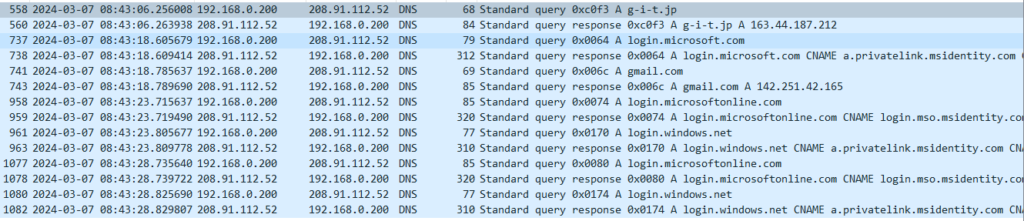
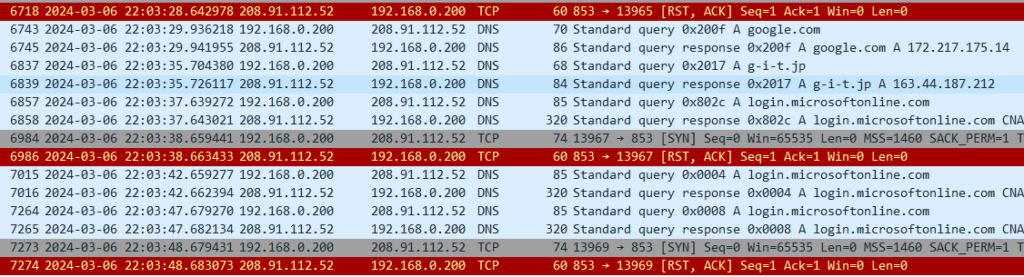
    DNS resolution is performed via an authenticated server
    to prevent DNS traffic from being hijacked.

    This is what it looks like when the feature is disabled.

    This is what it looks like when the feature is enabled.

    通常、ユーザ企業のキャッNormally, a user organization’s DNS cache server
    is not exposed to the outside.
    However, if a device inside the LAN is compromised,
    attacks can be launched from the internal network
    even when the server is not an open resolver.

    We will verify how the system behaves
    when such an attack occurs.

    We will not attempt to reproduce
    every possible pattern of an infected endpoint,
    as complete coverage is unrealistic.

    With Secure DNS enabled,
    we will verify whether security functions
    also apply to the session
    between the FortiGate and the PC.

    Depending on the browser,
    a direct session may be established
    between the PC and an Internet DNS server.
    In such cases,
    the FortiGate may not be able to intervene.
    That possibility itself
    may become a valid test result.

    Our service is knowledge,
    not hardware resale.
    We will clearly communicate
    what cannot be done
    and what can be handled
    at the PC level alone.

    We will also reproduce a scenario
    in which communication between the FortiGate
    and upstream DNS servers is hijacked.

    In a previous test,
    we configured the query destination
    as a fake DNS server
    and confirmed that the system
    could be deceived.

    In this round of testing,
    we will again observe
    how the hijacking occurs
    and verify that Secure DNS
    prevents it.

    A separate function exists
    for domain-based email authentication.
    However, even if a malicious email is received,
    it is sufficient to prevent data exfiltration afterward
    (egress protection).

    From this perspective,
    URL filtering and Secure DNS
    (which quarantines dangerous IP addresses
    at the server side),
    as well as C&C protection
    (which blocks communication
    to IP addresses identified as malicious),
    should be used together.

    Even if a device becomes infected
    with a bot that attempts to post
    to message boards or forums,
    URL filtering can block
    the posting action itself
    by preventing access
    to those destinations.

    This topic is commercially sensitive
    and considered a “hot” area,
    so specific implementation methods
    will not be disclosed for free.

    As PPAP prohibition becomes widespread,
    very few organizations believe
    that “since the email itself is encrypted,
    attachments can be sent as-is.”
    In practice,
    the use of web storage services
    is increasing.

    We will also examine
    more efficient and smarter usage
    of web storage
    in the following section:
    “WAN Optimization —”.

     We will use Linux (with the tc command)
    as a line simulator,
    intentionally degrading network quality,
    and then verify how much performance
    can be restored by FortiGate.

    There is a “synchronization” option
    on the NAS currently in use.
    If this refers to network redundancy,
    we may purchase an identical NAS
    to verify whether WAN optimization
    can function also as a WAN acceleration mechanism.

    We may also capture traffic
    from a voice application over HTTPS
    and measure RTT and jitter
    to quantify the effects.

    Depending on the results,
    we will present objective measurements
    rather than theoretical assumptions

    Honestly, one might ask,
    “If a UTM is already in place,
    is there really a need to terminate traffic at a proxy?”

    We will explore
    what can only be achieved
    through proxy functionality.

    If it is necessary
    to prevent clients
    from learning the destination IP address,
    a reverse proxy can be used.

    Whether FortiGate
    can function effectively
    as a reverse proxy
    will be verified in future testing.

    This function itself リンク先スレッド We have already touched on this feature,
    but we will conduct more in-depth validation testing.

    We plan to conduct various intrusion tests
    (penetration testing)
    to verify whether attacks can be successfully blocked.
    (The general approach has already been published
    on our personal blog.)

    We will also configure known C&C IP addresses
    (IP addresses classified as malicious)
    on other network devices
    within the local environment,
    and verify that communication
    is blocked in both directions
    —outbound and inbound.

    In addition,
    we will test defenses
    against stealth scans,
    as well as alerting functions
    that generate email notifications.

    Our previous experience
    has been limited to SMTP-based methods,
    so we will challenge ourselves
    to explore alternative approaches.

    We will conduct validation testing
    by launching attacks over Wi-Fi
    and verifying that communications
    can be properly blocked.
    We are currently studying Kali
    for this purpose.

    ① Rogue AP detection
    We will verify the function
    that detects access points
    broadcasting the same SSID/PSK
    as those under the control
    of a FortiGate configured as a WLC,
    but not actually managed by it.
    Additional notes will be added
    when time permits.

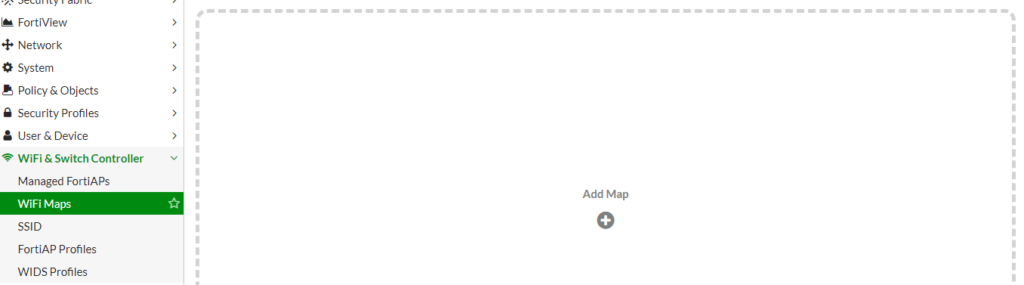
    ② The function shown
    in the image below
    has caught our interest.
    We will test it by combining
    FortiWiFi and FortiAP units
    (both already obtained).

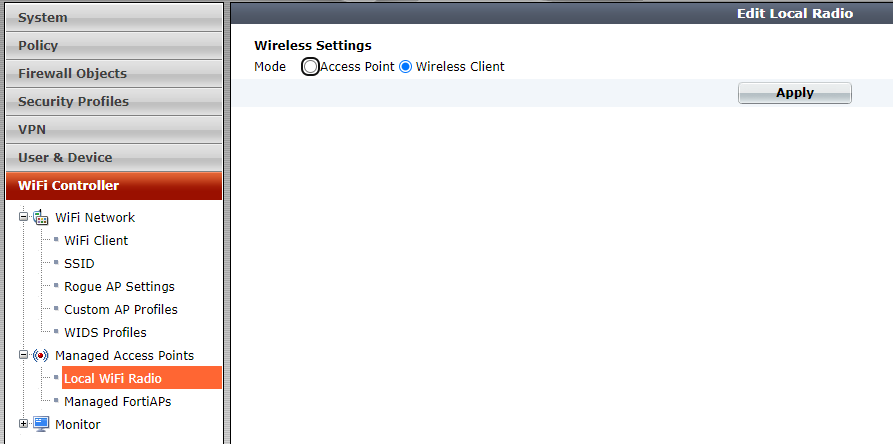
    We will connect the FortiWi-Fi
    under another access point.

    First,
    apply Wireless-Client Mode
    from the pane shown below.

    After this,
    a reboot will be required,
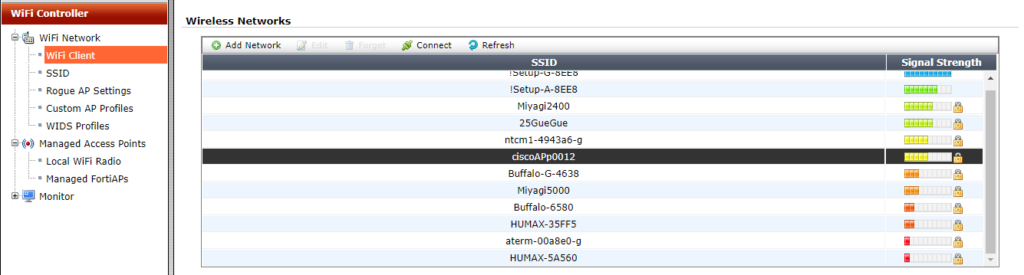
    so restart the device when prompted.

    Then,
    in the pane shown below,
    you will be able to select
    the access point
    to connect to.

    After selecting the SSID
    you wish to connect to,
    click Connect.

    If you choose a Security Mode
    other than “Open,”
    you will be prompted
    to enter the PSK
    (Pre-Shared Key).

    Enter the key,
    then click Connect again.

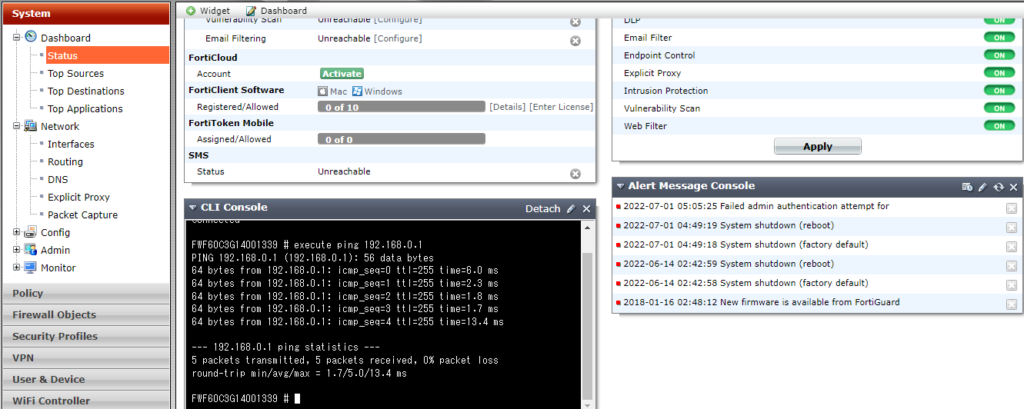
    From the Dashboard CLI,
    we were then able to successfully ping
    the default gateway
    via the connected access point.

    At this stage,
    connectivity is limited
    to the default gateway only.

    There is no connectivity
    to the Internet
    beyond the uplink access point.

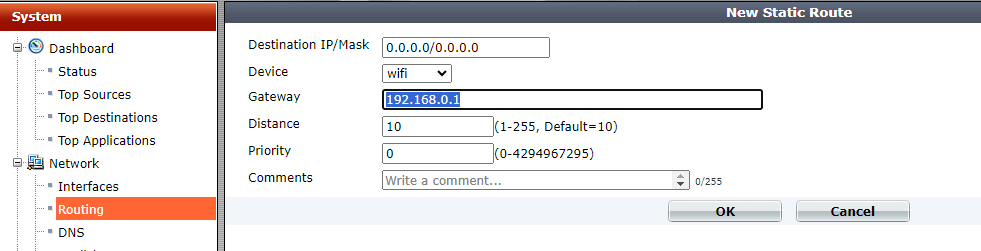
    Therefore,
    we manually configure
    the default gateway.

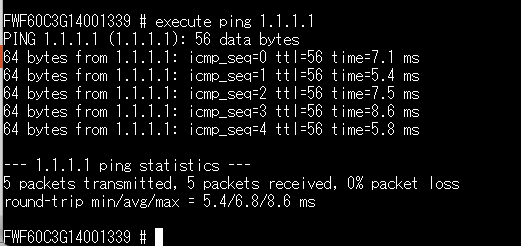
    We were able to successfully ping
    the Internet.


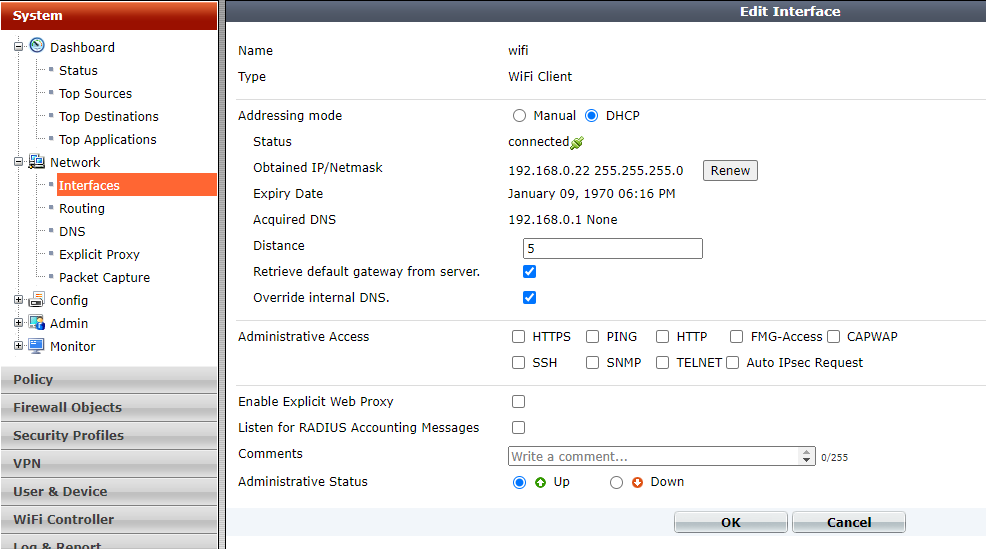
    In the pane shown below,
    if you enable “Retrieve default gateway from server,”
    the Wi-Fi interface loses its IP address.
    Therefore, this method is not recommended.

    We will also verify
    that the device functions properly
    as a network appliance,
    ensuring that traffic for specified classes
    does not exceed
    the configured bandwidth limits.

    Performance evaluation of QoS
    is one of our core strengths.

    In addition,
    we will demonstrate through testing
    how the legacy priority control method
    known as PQ
    can indefinitely delay
    the transmission of long packets.

    Lack of awareness
    of this anti-pattern
    often leads to configurations
    where everything is placed into PQ.
    This reflects a broader issue:
    many network engineers
    are not sufficiently familiar
    with the underlying principles
    of CPU scheduling behavior.

    In the era of Web-RTP,
    there is little reason
    to rely on the legacy
    “SIP-specific NAT handling” anymore.

    Regarding VoIP,
    we have repeatedly challenged
    questionable claims
    made by so-called
    “Web-RTP providers.”
    Key findings are listed below.

    “The cause is electromagnetic interference.”
    → We monitored
    with a spectrum analyzer
    for several days
    across the 40 MHz–6 GHz range.
    No transient emissions
    capable of explaining the issue
    were detected.

    “The packet payload is not RTP.”
    → When decoded in Wireshark
    as RTP, the payload
    was confirmed to be RTP.
    It was possible
    to reconstruct audio files
    from the packets.
    However, spectrum analysis
    showed full-band dispersion,
    indicating encryption.
    Therefore, in that case,
    we were unable to identify
    the root cause
    of the reported noise.

    This should perhaps belong
    in the QoS section,
    but many Web-RTP providers
    do not understand
    excess burst
    or committed burst parameters.
    Some even claim
    that “the peer router is Cisco,
    so it will handle it properly.”
    In practice,
    they often do not understand
    RSVP at all.
    A short two-way discussion
    usually reveals
    the technical gaps immediately.

    Noise in VoIP audio
    may be caused by
    AI-based noise cancellation.
    Voices from other operators
    in the background
    are not always removed effectively.
    In some cases,
    traditional phase-inversion
    techniques
    (overlaying an inverted signal
    from the rear direction)
    can be more effective.

    Cloud services may “move” servers geographically
    during an active session.
    As a result,
    the destination IP address
    can change while communication is in progress.

    Because of this behavior,
    there are cases
    where Web filtering
    cannot be enabled.
    The cause is outlined below.

    When packet fragmentation occurs
    during communication,
    two well-known domestic UTM vendors
    (both Y and N)
    lose connectivity.
    FortiGate, however,
    continues communication
    without issue.

    Both vendors confirmed
    that the root cause
    is the same.
    (We verified this directly
    with the manufacturers.
    The fact that they were not fully aware
    of the issue in real operations
    was somewhat concerning.)

    • They perform Web filtering
      by inspecting strings
      inside packet payloads
      rather than using DNS.
      When packets are fragmented,
      the payload cannot be read.
    • Allowed IP addresses
      are internally cached.

    FortiGate performs Web filtering
    based on FQDN,
    so this interruption
    does not occur.

    For vendor Y,
    we confirmed the algorithm
    through the reseller.
    For vendor N,
    we reproduced the issue ourselves
    and escalated it
    to the manufacturer.

    In the case of vendor N,
    out of roughly 50 tests,
    the issue occurred
    in more than 5 out of 6 attempts.
    For FortiGate,
    after 6 consecutive successful runs,
    we concluded the test.

    We will reproduce this behavior
    in our own environment
    and publish the results.

    For reference,
    we list the tools
    to be used.

    Tools used

    Httping

    Cisco 800
    (used as a Web server,
    with multiple IP addresses
    assigned via secondary IP)

    FakeDNS

    This is not a particularly advanced technique,
    but there are still cases
    where deployments are abandoned
    simply because
    the cloud environment
    and the on-premises LAN
    use the same IP subnet.

    The original designer
    is the same as that of the SSG line,
    although it is not widely known
    that Juniper merely acquired
    the NetScreen company.

    Since implementation
    is not guaranteed
    in every environment,
    we will actually deploy it
    and verify through testing.

    For high-volume traffic
    such as Office 365 updates,
    it is generally preferable
    to use a dedicated circuit
    or an internal WSUS server
    (although WSUS itself
    may now be considered legacy).

    However,
    when the IP addresses
    returned by DNS change,
    routing cannot be controlled
    reliably using conventional methods.

    For this reason,
    routing is performed
    based on DNS information
    (FQDN routing).
    We will verify this behavior
    in practice
    and publish the results.

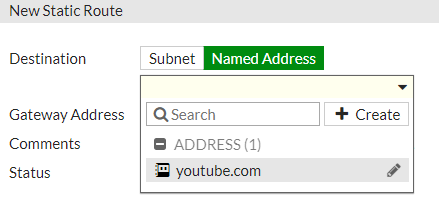
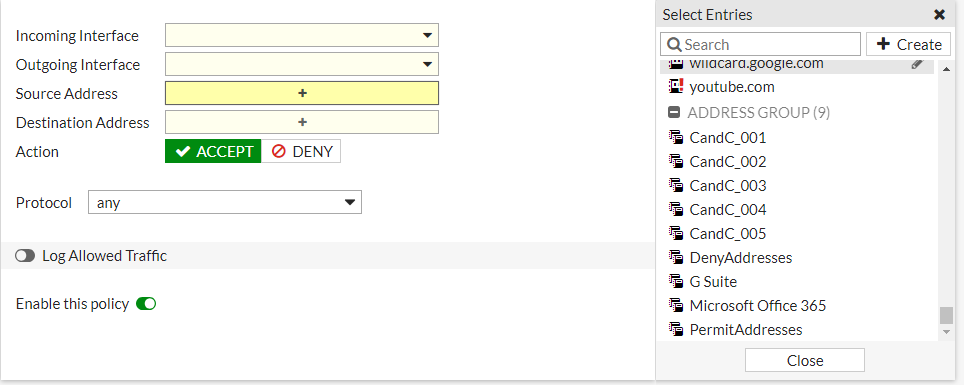
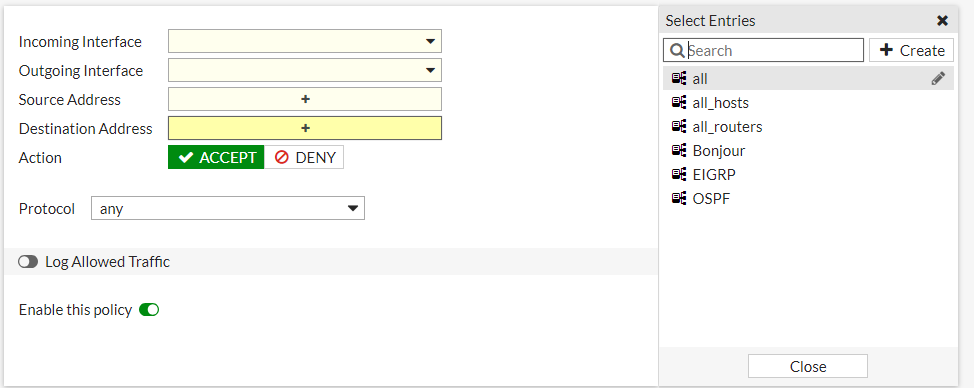
    The configuration
    looks like this:
    when creating an address policy,
    there is a checkbox labeled
    “Use in static route.”
    Once enabled,
    the static-route creation pane
    appears as shown below.

    When multiple circuits are available,
    this enables high cost-performance
    Active/Active operation.
    We will build an intentionally unbalanced setup
    in which one circuit
    is consistently lower in quality,
    and verify the behavior in practice.

    Inbound load balancing
    is also possible,
    but only with basic health checks.
    Therefore, it is not suitable
    for full Web server load balancing.

    It is worth noting
    that by combining multiple DNS servers,
    a form of wide-area load balancing
    can be achieved.
    Since FortiGate itself
    can operate as a DNS content server,
    we will also test
    whether wide-area load balancing
    can be implemented
    using FortiGate alone.

    Using another network device
    to perform Twice NAT
    —so that the load-balanced destination
    and source are translated simultaneously
    before querying FortiGate for DNS—
    would technically work,
    but that approach
    does not feel aligned
    with the design intent.

    We often see organizations
    applying IPsec
    on top of already encrypted traffic
    such as Office 365,
    SNMP over TLS,
    and DNS over TLS,
    resulting in unnecessary
    performance overhead.

    We will verify in practice
    how encryption can be applied
    only to selected traffic
    —for example SMB
    used by NAS systems—
    and publish the results.

    Organizations with ample budgets
    often resolve such issues
    by replacing equipment
    with larger, more expensive models.
    However, since our service
    does not rely on SI-style resale
    or pushing high-cost hardware,
    we believe this is a strong case
    demonstrating the value
    of an optimization-focused approach.

    This idea came from a separate discussion
    about “dumping server memory via Telnet
    for quarantine and inspection.”

    Since SSH is encrypted,
    it would normally be difficult
    to detect malware
    contained in server memory.
    However, by combining it
    with inspection features,
    it may become possible,
    so we will verify this behavior.

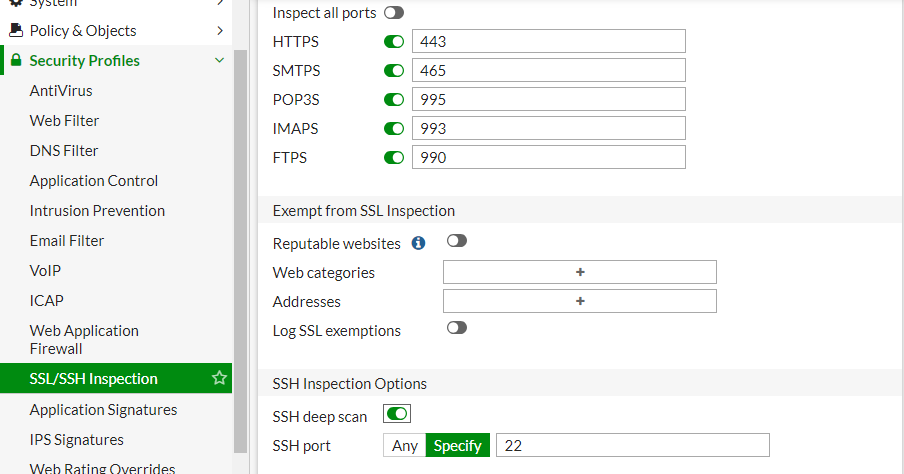
    We will also test
    whether it is possible
    to block SCP/FTPS/SFTP
    while allowing SSH itself
    by using inspection features
    on the network device side,
    rather than disabling
    file transfer functions
    on the SSH server.

    The results of these tests
    will be published here.

    While it is obvious
    that the device does not have
    sufficient power
    to accelerate Web servers,
    we would still like to attempt
    SSH certificate interception.
    From the image below,
    it is not yet clear
    how the SSH private key
    would be installed.

    There should be a function
    to prevent the device
    from behaving statefully.
    We will verify
    whether this can be achieved
    by combining it
    with transparent mode.

    However,
    since FortiGate alone
    is capable of capturing packets
    while applying filters,
    it may be sufficient
    to perform filtering
    directly in transparent mode.

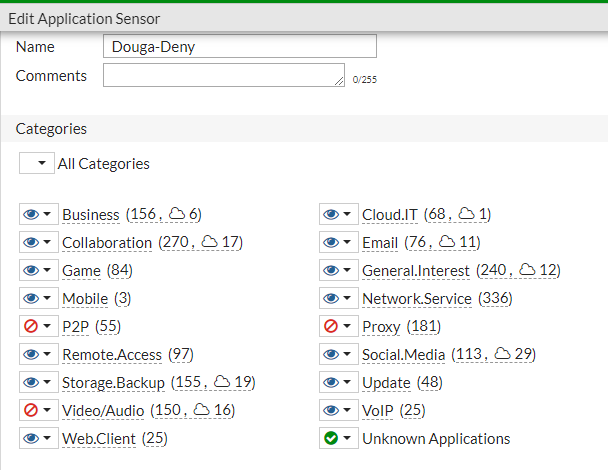
    Only during specified time periods
    are selected applications
    (or their traffic) permitted.

    In the example below:

    • From 06:00 to 10:00, all traffic is allowed.
    • During all other hours, video (YouTube) is blocked.

    The parent IPv4 policy
    is set to allow,
    and a child application-control policy
    is applied
    to block Video/Audio.

    In this configuration,
    only video traffic is blocked,
    while other communications remain permitted.

    YouTube is blocked,
    but video content
    embedded in news sites
    is not blocked.

    When used in combination with Wi-Fi,
    it is unclear whether there is a function
    that converts destination MAC addresses
    from multicast to unicast
    or performs load balancing.

    However, the following type of control
    appears to be possible.

    Rather than conducting exhaustive tests
    using tools such as VNC,
    we plan to perform validation
    after Hikari TV is installed in our home.

    Testing with real multicast traffic
    is more meaningful
    than relying solely on synthetic simulations.

    Deploy one unit
    in transparent mode
    at each teleworker’s home,
    and have IPS/WAF
    inspect traffic
    in the WAN-to-LAN reverse direction.

    Validation is likely unnecessary.

    This may be achievable
    in transparent mode.
    We will verify this
    on actual hardware later.

    It is unclear
    how meaningful the results will be,
    but we may also test
    using a VM-based virtual appliance.


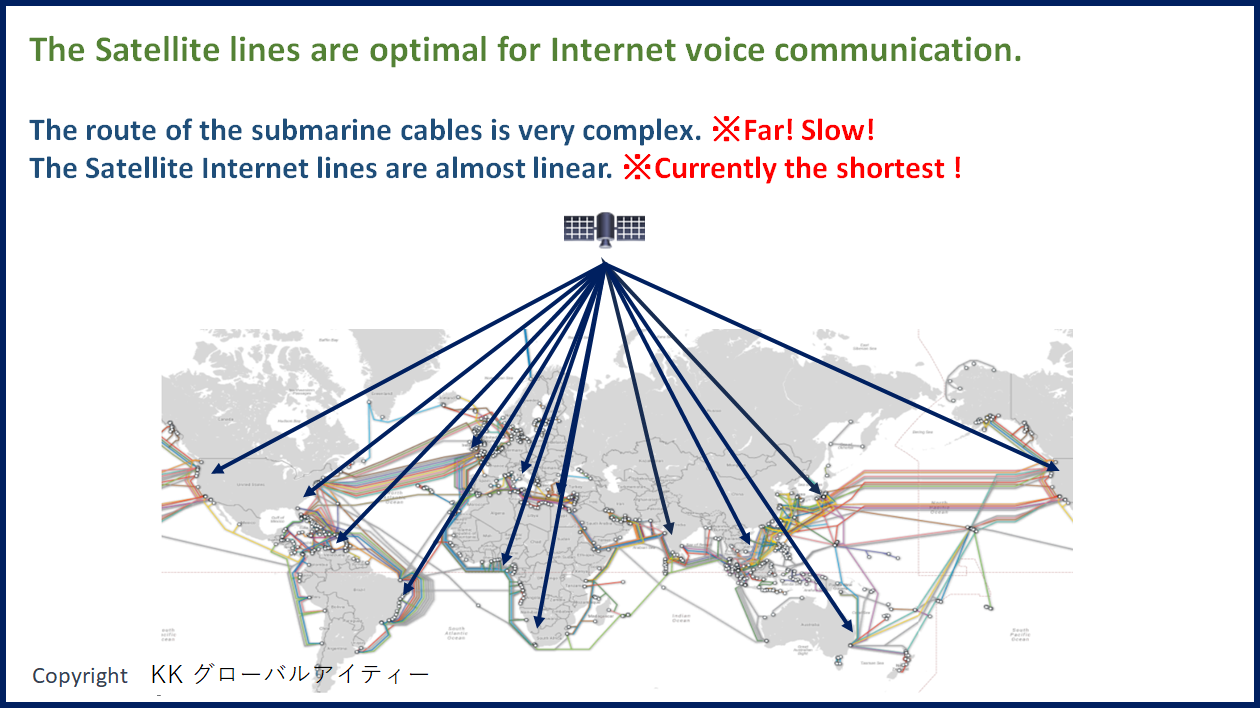
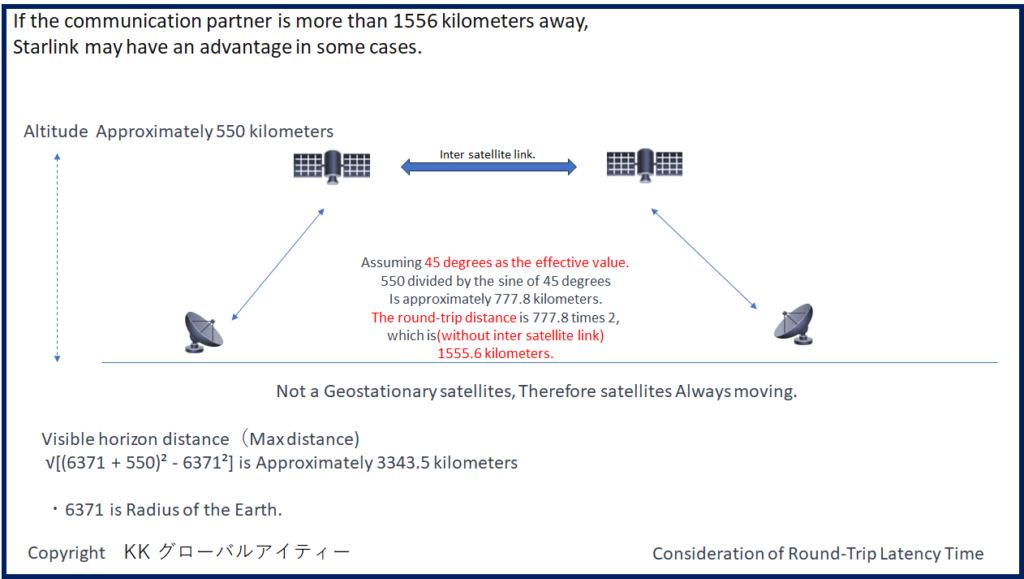
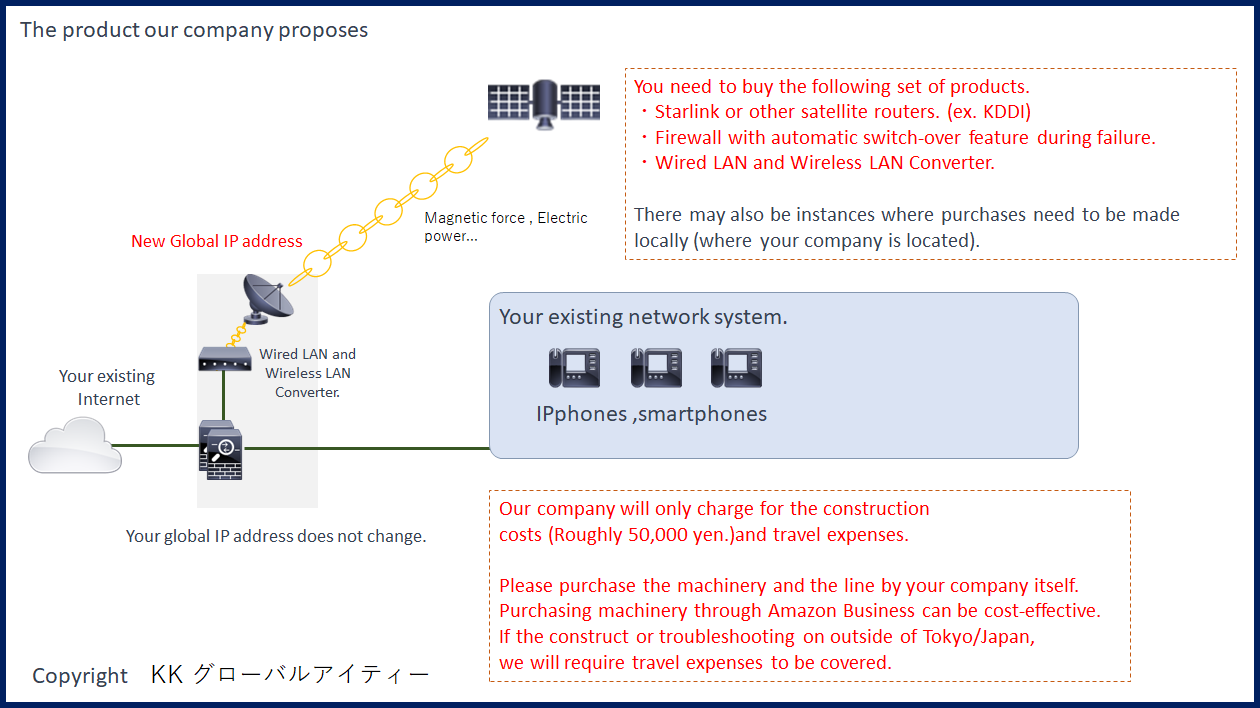
  • For companies outside of Japan(Long-distance voice communication)

    For companies outside of Japan(Long-distance voice communication)

    Additionally, it is necessary for your company to independently
    contract for the Starlink router.

    We are currently monitoring the round-trip time between various locations around
    The world and Tokyo 24 hours a day.
    The official release will take place after the completion of measurements.

  • 受注実績 と SpecialThanks

    受注実績 と SpecialThanks

    ※掲載を希望しない方はご連絡ください。
    受注実績
     ・並木哲夫 工学博士 様
     ・レバテック株式会社 様
     ・株式会社 アイスタンダード様

    SpecialThanks(かな順)
     ・오쿠이 히로다 様(SniperIPS研究家)
     ・海堂 正裕 様
     ・小内米太郎 様
     ・チェック・ポイント・ソフトウェア・テクノロジーズ 様

    MailTo:kowatanabe001@g-i-t.jp