
Consolidating 20+ Devices into 4 Firewalls
In many legacy enterprise environments, network topology evolves without being redesigned. Devices are added over time, but rarely removed. The result is an architecture with over twenty devices performing overlapping or redundant roles.
In one recent case, we proposed a radical simplification: consolidating more than twenty devices into just four firewalls.
The target architecture consisted of:
- External Firewall (Primary)
- External Firewall (Secondary)
- Internal Firewall (Primary)
- Internal Firewall (Secondary)
This was not merely a hardware reduction. It was a redesign of responsibility, routing, segmentation, and operational logic.
Direct WAN Termination on Firewalls
The original environment included multiple routers terminating various WAN circuits. Instead of maintaining separate routing devices, we made a deliberate decision:
- Terminate WAN circuits directly on the firewall
- Eliminate standalone routers entirely
Modern firewalls are fully capable of handling WAN termination, dynamic routing, policy routing, and redundancy. Keeping routers “because that’s how it has always been done” adds cost without increasing resilience.
By collapsing routing and security into the firewall layer, we reduced devices and simplified failover design.
Segment-Specific Default Routes
Instead of using a single upstream path for all traffic, we implemented:
- Separate default routes per LAN segment
Each segment was intentionally given its own outbound path policy. This approach improved traffic control, enabled cleaner security zoning, and removed the need for complex L2 workarounds.
Design replaces bandwidth as the primary performance tool.
Eliminating All L2 Switches via Firewall VLAN Control
Modern firewalls allow direct VLAN configuration and segmentation control. Therefore:
- All downstream Layer 2 switches became unnecessary
Rather than ignoring available firewall interfaces, we used them deliberately. When a firewall provides switch-like port density and VLAN control, placing a Layer 2 switch beneath it “by default” wastes both capital and architectural clarity.
Reducing switching layers:
- Decreases failure points
- Reduces broadcast domain ambiguity
- Simplifies troubleshooting
- Improves total asset efficiency
Port cost matters. Unused firewall interfaces represent hidden capital waste.
Security Expansion via License Modification
The consolidation strategy also improved future security posture. Instead of purchasing new appliances:
- IPS and WAF capabilities can be activated through license changes
Security evolution becomes a software decision, not a hardware replacement project. This dramatically improves capital efficiency and deployment speed.
Built-in WLC for Future Wireless Expansion
The firewall platform includes a Wireless LAN Controller function enabled by default. This provides:
- Immediate readiness for future wireless AP deployment
- Unified security and wireless policy control
- Improved cost-performance ratio during expansion
When wireless infrastructure is introduced later, no separate controller appliance is required. The architecture scales without structural redesign.
Design Is the Investment
The consolidation from over twenty devices to four was not a budget cut. It was a design correction.
Overinvestment in hardware often masks underinvestment in architecture. True efficiency does not come from adding devices, but from redefining their roles.
Twenty-plus devices were reduced to four.
Routers were removed entirely.
Switch layers were eliminated.
Security features became license-driven rather than hardware-driven.
This is not minimalism. It is structural clarity.
Decrypting files encrypted by ransomware
Add a Firewall/UTM from a Different Vendor
By adopting a firewall/UTM from a different vendor than the existing one, a layered defense strategy is achieved.
Theoretical Maximum Downtime: 10 Seconds
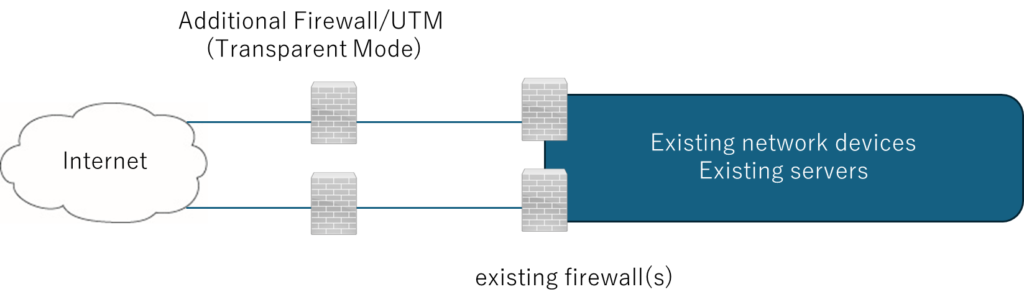
The “within 10 seconds” requirement is based on the Layer-1 keepalive timer.
Transparent Mode:
A device that operates like a Layer-2 switch while functioning as a firewall/UTM.
The discovery timing of newly identified vulnerabilities will be the same for manufacturers that adopt open algorithms.
At the link below, we introduce firewall/UTM vendors whose products are more closed in design. (Please note that the content may remain in Japanese.)
Internal link
Compromised Home Routers Used as Attack Proxies
Home Routers as Attack Proxies
Compromised Consumer Routers for External Attack Proxying
Consumer Router Botnets Used for External Attacks
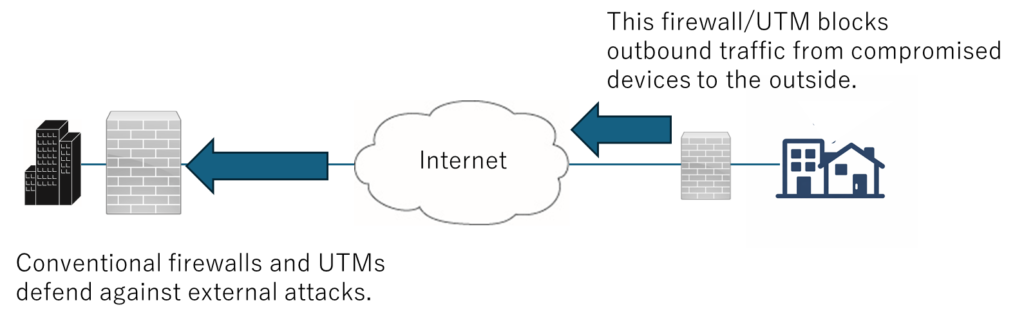
The FW/UTM on the right side of the diagram blocks outbound traffic from compromised devices from reaching external networks.
The above firewall/UTM is assumed to operate in transparent mode (functioning as an L2 switch while providing firewall/UTM-equivalent protection).
A Tool That Further Supports Our GenAI-Driven DX Enablement Service
Remove micro-friction from development so leadership can keep the tempo.
Visual Studio automation as RPA
Visual StudioなどのGUIでどこをクリックすればよいか分からない場合、GenAIはPythonベースの自動化機能を使ってマウスの動きとクリックを代行します。
これにより、画面共有セッション中の「カーソルの迷い」が解消され、実装、意思決定、検証のペースを維持できます。
このアイデアは無料です。
Visual Studio automation as RPA
ログ4 CIOを表示
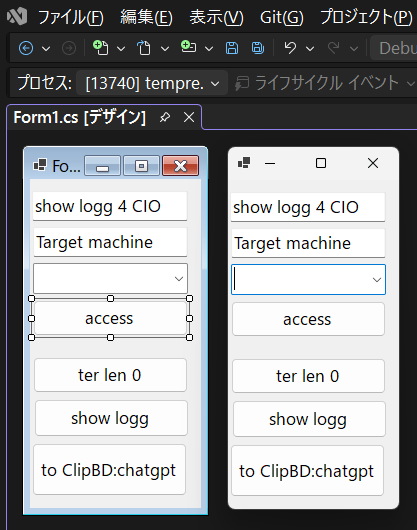
Deterrence created when a CIO uses on-site operational terminology.
経営幹部でさえ、短縮されたCLIコマンドを理解できます。
理解のスピードは意思決定のスピードに直結するからです。
Confirm you are logged into the intended target.
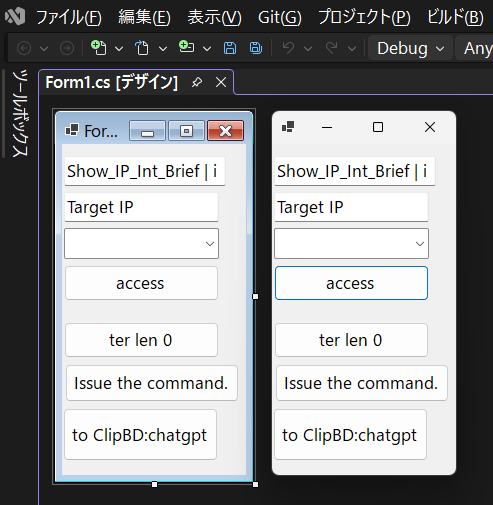
Deterrence created when a CIO uses on-site operational terminology.
経営幹部でさえ、短縮されたCLIコマンドを理解できます。
理解のスピードは意思決定のスピードに直結するからです。
Ping_research_From_CIO
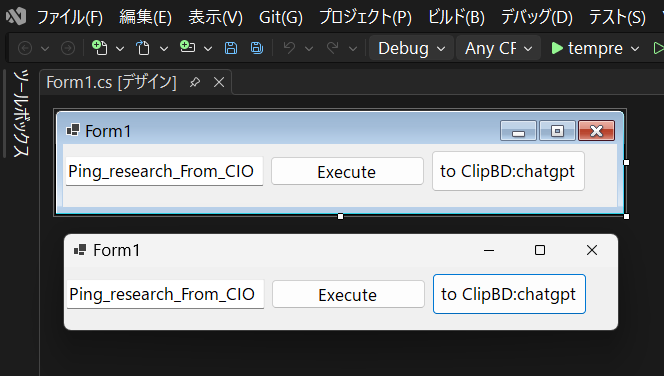
Deterrence created when a CIO uses on-site operational terminology.
経営幹部でさえ、短縮されたCLIコマンドを理解できます。
理解のスピードは意思決定のスピードに直結するからです。
Full System Backup Acquisition (All Devices)
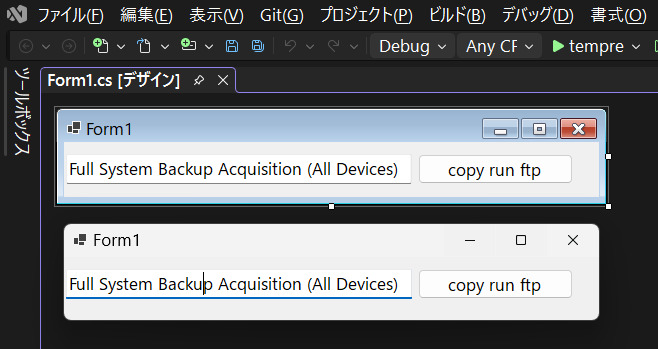
Deterrence created when a CIO uses on-site operational terminology.
経営幹部でさえ、短縮されたCLIコマンドを理解できます。
理解のスピードは意思決定のスピードに直結するからです。
Download large files from a browser using a protocol that does not congest the network.
HTTP/HTTPSのパケットサイズは小さいため、FTPなどの通信と違い、回線を独占する事はありません。
Use externally issued server certificates; self-signed certificates are not recommended.
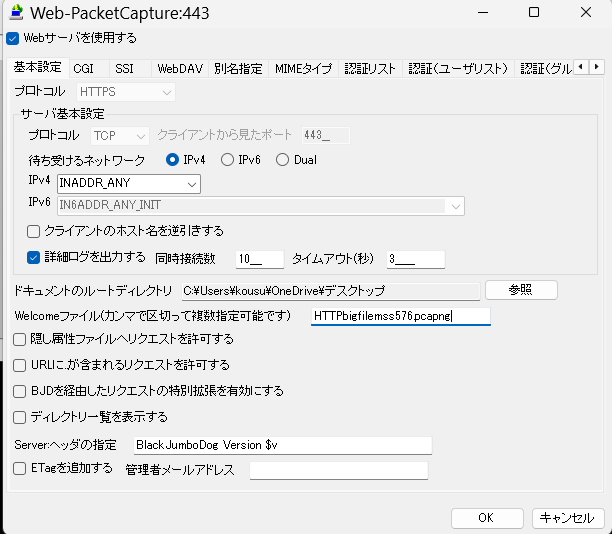
If a packet capture result file is specified as the welcome file, the download will start as soon as the web server is accessed.
BJD is a paid service, but it is sufficiently mature, and a sufficient number of bugs have already been fixed.
A lightweight screenshot tool with random intervals (1–5 minutes)
This tool automatically captures snapshots of the PC screen at random intervals between 1 and 5 minutes and saves them to a designated folder.
It is designed for lightweight visual logging of development, testing, and troubleshooting activities without the overhead of continuous video recording.
What it does
- メインディスプレイ全体をランダムな間隔(1~5分)でキャプチャします。
- Many existing tools cannot record images at random interval timings.
- スクリーンショットをPNG形式で保存します
- ユーザーが保存場所を選択できるようにする
- Minimal interface with only three buttons
Buttons
- Select Image Storage Location
- Start Recording
- Stop Recording
Intended use
- Visual work logs for development and verification
- Evidence collection for troubleshooting and reporting
- Lightweight documentation without generating large video files
File format and naming
- Format: PNG
- Example filename:
Snap_YYYY-MM-DD_HH-mm-ss_fff.png - Optionally grouped by date in subfolders for easier navigation
Behavior
- After each capture, the tool waits a random duration between 1 and 5 minutes before taking the next snapshot
- Recording continues until the user presses Stop Recording
- If the storage location becomes unavailable, recording stops automatically to prevent silent failures
This tool is intentionally minimal and built for clarity, reliability, and low system impact.
Sound-Based Monitoring for Servers and Network Equipment
I once deeply respected the diligence of the security personnel stationed at a data center. They noticed a reboot event by sound alone and reported it faster than any monitoring system. That experience reinforced a simple truth: the physical layer often speaks before dashboards do.
This concept monitors the physical “voice” of infrastructure: fan noise, airflow tone, vibration-related sounds, and sudden acoustic events. A small sensor node (for example, a Raspberry Pi with an I2S MEMS microphone) measures acoustic level over time, stores the data as a time series, and visualizes it as a graph. When the measured level exceeds a defined threshold, the system can notify operators by email (or other channels) as an early warning.
Logical monitoring (SNMP, syslog, metrics, logs) is already common. Sound monitoring is different: it observes the real-world environment around the hardware. In many on-prem environments—small server rooms, branch offices, clinics, factories, or shared racks—this “physical layer monitoring” can provide a practical safety net with minimal cost and complexity.
The key value is not “audio recording,” but “state detection.” Operators do not need high-fidelity sound; they need a stable signal that reflects mechanical behavior. Even a simple time-series graph can deliver reassurance: if the baseline remains stable, operators gain confidence that nothing abnormal is developing. When the signal shifts, it can indicate a real-world change worth checking on-site.
What this system measures (practical signals)
- Average acoustic level over time (e.g., per 10 seconds / per minute)
- Short spikes (sudden events) and sustained elevation (continuous abnormality)
- Frequency-band energy (FFT) to detect “tone changes,” not only loudness
Why sound monitoring can complement existing tools
- Detects physical anomalies that may not appear in SNMP/logs at an early stage
- Provides a “reality check” for on-prem rooms where full telemetry is not deployed
- Supports human trust: “no change on the graph” is a form of operational reassurance
Alerting and reporting
- Email notification when the level crosses a threshold
- Trend-based alerting (e.g., deviation from baseline rather than absolute dB)
- Daily/weekly auto-generated graphs (PNG/PDF) for quick review by operators or executives
Recommended sensing approach
- I2S MEMS microphone for stable digital capture and reduced analog noise sensitivity
- Small Linux node for continuous operation (low power, easy replacement)
- Simple storage format (CSV/SQLite) to keep the system transparent and maintainable
Where this is most useful
- Small and medium on-prem server rooms without full-scale monitoring investments
- Branch sites where “someone occasionally checks” is still the reality
- Environments where physical deterrence matters: “We also observe the physical layer”
What makes this idea viable as a product or service
- Low cost per node and simple installation
- Clear differentiation: a physical-layer signal that existing tools usually ignore
- Easy integration into a broader offering (on-site inspection, cabling audit, operational reporting)
Tips
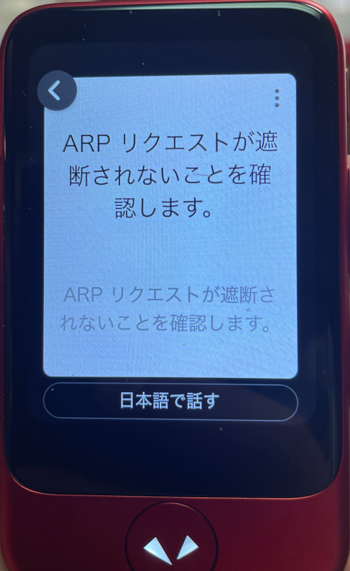
Pocketalk did not recognize “ARP” when I pronounced it as “āpu” in Japanese,
so I had to pronounce it as “A, R, P,” letter by letter.