
Although I said in another thread that I would “start researching SOHO/SMB products,” I would like to introduce Fortigate, which I have a special attachment to, in this thread.
I plan to write this rambling post without any structure, but I do intend to organize it in the future.
■Hiding the defending firewall and server OS
I probably lied in another thread. Sorry.
Even in transparent mode, Fortigate responds to OS scans saying “I’m the one protecting you.” However, this has the advantage of hiding the OS type of the subsequent firewall and server.
■HA configuration and failure testing
We do not adopt HA (high-availability) configurations—where two devices operate as a single logical unit.
A well-known SIer we previously worked with considered HA non-recommended,
and our company shares that position.
We recognize that the primary advantage of HA is automatic configuration synchronization,
which reduces operational overhead.
However, when the primary and secondary units use different circuits,
adopting HA means the Internet cannot be terminated directly on each device.
This increases the number of required appliances.
For this reason, our independent view is not to adopt HA in such scenarios.
Regarding failure testing,
we plan to publish examples centered on transparent-mode configurations.
We will also include common anti-patterns.
A frequently observed case is as follows:
“In reality, no spanning-tree domain had been formed.”
In this situation, failover testing appears to succeed,
but the switchover actually occurs only because of a MAC address table timeout
(approximately five minutes).
This can result in up to five minutes of traffic interruption.
With Rapid Spanning Tree, the theoretical recovery should be limited to
a single flood event.
If a longer interruption occurs, it indicates a design error
on the part of the engineer responsible for the build.
Side note
There is no other appropriate place to document this,
so we include it here.
Yamaha’s VRRP implementation appears to have ICMP Redirect enabled by default.
This can become a reason it does not interoperate with VRRP from other vendors.
We have no plans to purchase current Yamaha or NEC models
solely for verification purposes.
Even during the semiconductor shortages around 2022,
these were relatively unpopular models that manufacturers
could sell directly within a few days.
As a result, there are few companies or researchers
actively studying their vulnerabilities.
At the time, a sales representative even stated:
“We can prepare xxx units—three digits—by tomorrow!”
Such statements suggested a rather tone-deaf sales posture.
We would also like to state the following clearly:
Products in which vulnerabilities are discovered frequently
are easier to evaluate and monitor.
In that sense, frequent discoveries can be an advantage.
Products in which vulnerabilities are rarely discovered
often mean that no one is actively researching them.
In that sense, rarity can be a disadvantage.
Our company does not recommend devices
that lack professionally written technical specifications in English.
Products without English documentation
written by professional technical writers
cannot compete internationally.
For IT security equipment,
this becomes a critical flaw.
■FortiSandBox
We will conduct validation testing
by passing real malware samples
to verify detection capability.
The acquisition source has already been identified.
We are currently selecting a decoy PC
to be used as a controlled test endpoint.
In addition,
the license for our existing FortiGate
is approaching its expiration date,
so we are currently allocating budget
for renewal.
Stay tuned.
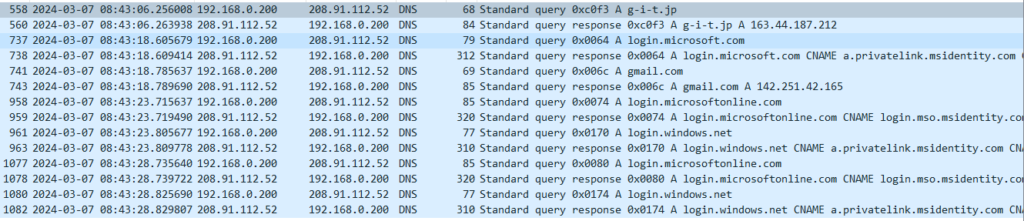
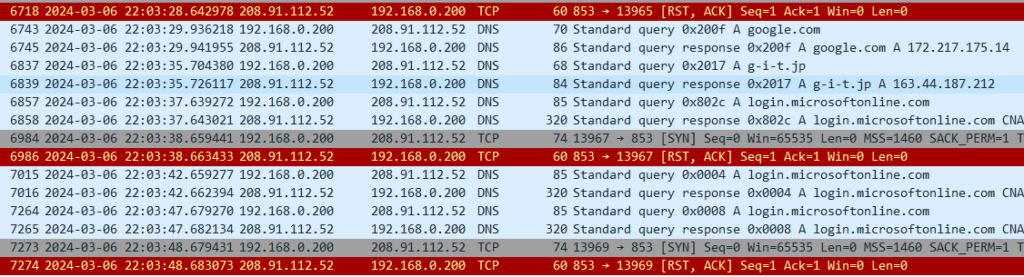
■ Secure DNS(Requests originated by FortiGate itself)
DNS resolution is performed via an authenticated server
to prevent DNS traffic from being hijacked.
This is what it looks like when the feature is disabled.
This is what it looks like when the feature is enabled.
■As a DNS cache server
with open resolver countermeasures in place
通常、ユーザ企業のキャッNormally, a user organization’s DNS cache server
is not exposed to the outside.
However, if a device inside the LAN is compromised,
attacks can be launched from the internal network
even when the server is not an open resolver.
We will verify how the system behaves
when such an attack occurs.
We will not attempt to reproduce
every possible pattern of an infected endpoint,
as complete coverage is unrealistic.
With Secure DNS enabled,
we will verify whether security functions
also apply to the session
between the FortiGate and the PC.
Depending on the browser,
a direct session may be established
between the PC and an Internet DNS server.
In such cases,
the FortiGate may not be able to intervene.
That possibility itself
may become a valid test result.
Our service is knowledge,
not hardware resale.
We will clearly communicate
what cannot be done
and what can be handled
at the PC level alone.
We will also reproduce a scenario
in which communication between the FortiGate
and upstream DNS servers is hijacked.
In a previous test,
we configured the query destination
as a fake DNS server
and confirmed that the system
could be deceived.
In this round of testing,
we will again observe
how the hijacking occurs
and verify that Secure DNS
prevents it.
■SecureE-Mail
A separate function exists
for domain-based email authentication.
However, even if a malicious email is received,
it is sufficient to prevent data exfiltration afterward
(egress protection).
From this perspective,
URL filtering and Secure DNS
(which quarantines dangerous IP addresses
at the server side),
as well as C&C protection
(which blocks communication
to IP addresses identified as malicious),
should be used together.
Even if a device becomes infected
with a bot that attempts to post
to message boards or forums,
URL filtering can block
the posting action itself
by preventing access
to those destinations.
This topic is commercially sensitive
and considered a “hot” area,
so specific implementation methods
will not be disclosed for free.
As PPAP prohibition becomes widespread,
very few organizations believe
that “since the email itself is encrypted,
attachments can be sent as-is.”
In practice,
the use of web storage services
is increasing.
We will also examine
more efficient and smarter usage
of web storage
in the following section:
“WAN Optimization —”.
■WAN optimization feature
We will use Linux (with the tc command)
as a line simulator,
intentionally degrading network quality,
and then verify how much performance
can be restored by FortiGate.
There is a “synchronization” option
on the NAS currently in use.
If this refers to network redundancy,
we may purchase an identical NAS
to verify whether WAN optimization
can function also as a WAN acceleration mechanism.
We may also capture traffic
from a voice application over HTTPS
and measure RTT and jitter
to quantify the effects.
Depending on the results,
we will present objective measurements
rather than theoretical assumptions
■As a proxy server
(forward / reverse)
Honestly, one might ask,
“If a UTM is already in place,
is there really a need to terminate traffic at a proxy?”
We will explore
what can only be achieved
through proxy functionality.
If it is necessary
to prevent clients
from learning the destination IP address,
a reverse proxy can be used.
Whether FortiGate
can function effectively
as a reverse proxy
will be verified in future testing.
■IP Reputation Database
(A feature that checks the “reputation” of an IP address)
This function itself リンク先スレッド We have already touched on this feature,
but we will conduct more in-depth validation testing.
■IPS&WAF
We plan to conduct various intrusion tests
(penetration testing)
to verify whether attacks can be successfully blocked.
(The general approach has already been published
on our personal blog.)
We will also configure known C&C IP addresses
(IP addresses classified as malicious)
on other network devices
within the local environment,
and verify that communication
is blocked in both directions
—outbound and inbound.
In addition,
we will test defenses
against stealth scans,
as well as alerting functions
that generate email notifications.
Our previous experience
has been limited to SMTP-based methods,
so we will challenge ourselves
to explore alternative approaches.
■Secure Wi-Fi
We will conduct validation testing
by launching attacks over Wi-Fi
and verifying that communications
can be properly blocked.
We are currently studying Kali
for this purpose.
① Rogue AP detection
We will verify the function
that detects access points
broadcasting the same SSID/PSK
as those under the control
of a FortiGate configured as a WLC,
but not actually managed by it.
Additional notes will be added
when time permits.
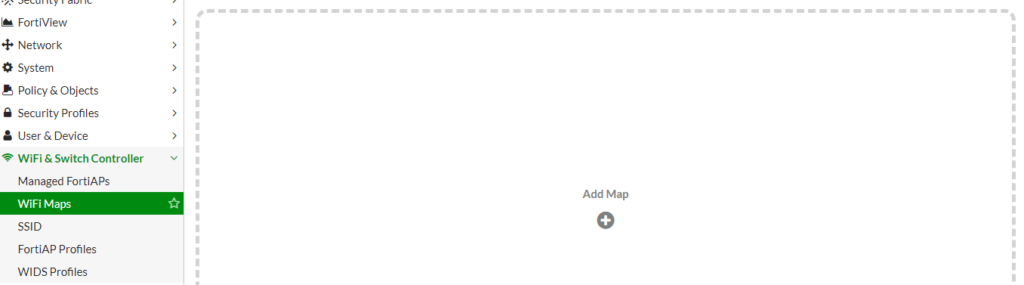
② The function shown
in the image below
has caught our interest.
We will test it by combining
FortiWiFi and FortiAP units
(both already obtained).
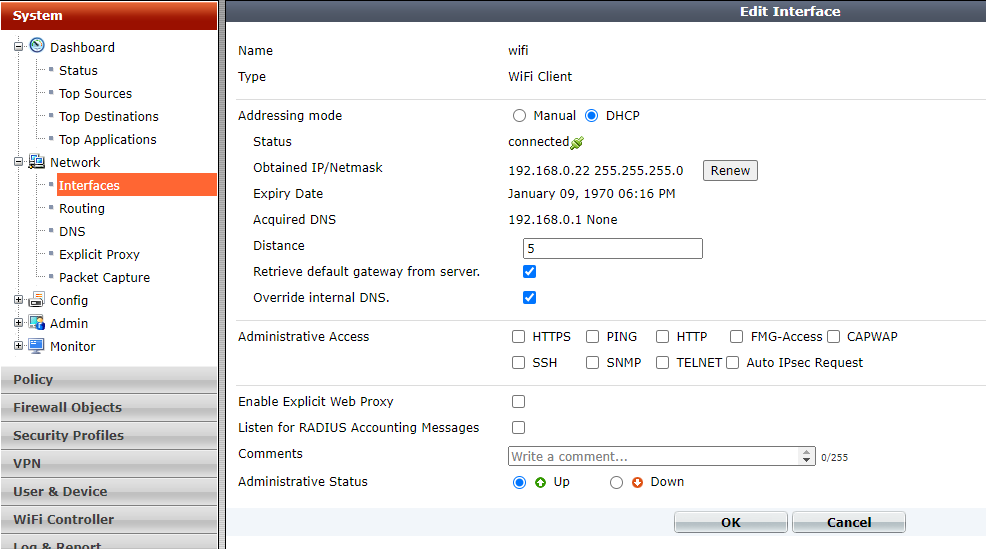
■As a Wi-Fi client
We will connect the FortiWi-Fi
under another access point.
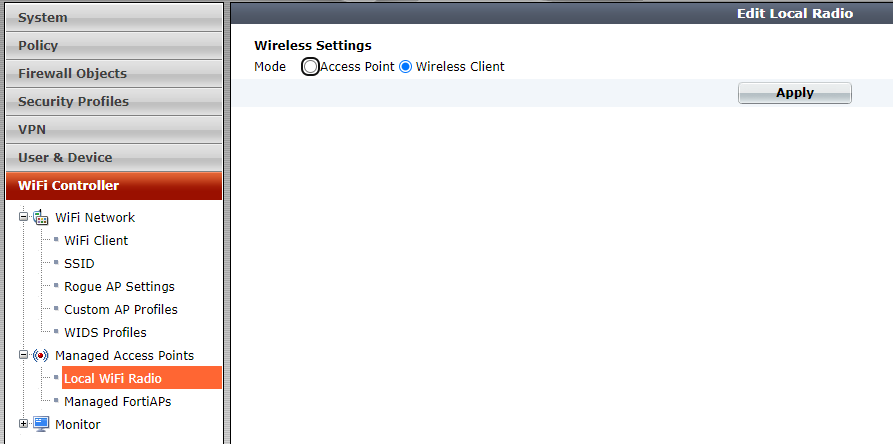
First,
apply Wireless-Client Mode
from the pane shown below.
After this,
a reboot will be required,
so restart the device when prompted.
Then,
in the pane shown below,
you will be able to select
the access point
to connect to.
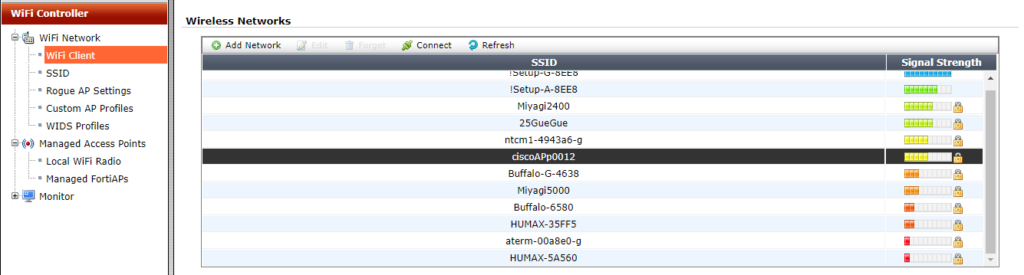
After selecting the SSID
you wish to connect to,
click Connect.
If you choose a Security Mode
other than “Open,”
you will be prompted
to enter the PSK
(Pre-Shared Key).
Enter the key,
then click Connect again.
From the Dashboard CLI,
we were then able to successfully ping
the default gateway
via the connected access point.
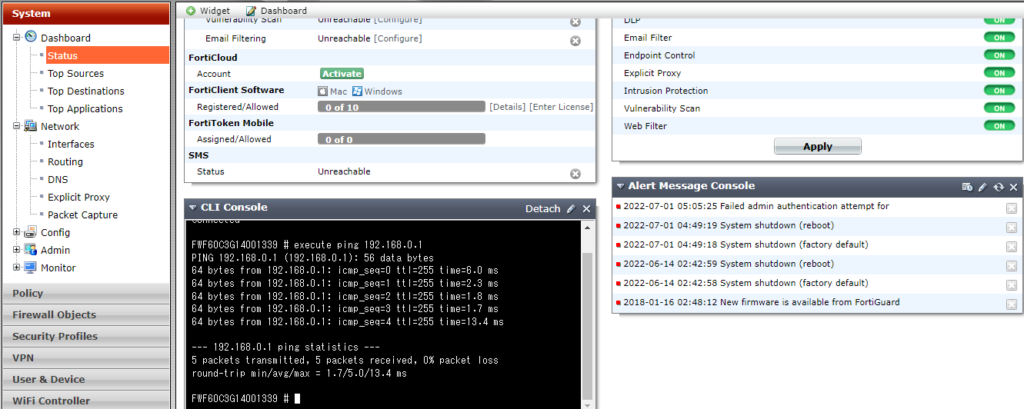
At this stage,
connectivity is limited
to the default gateway only.
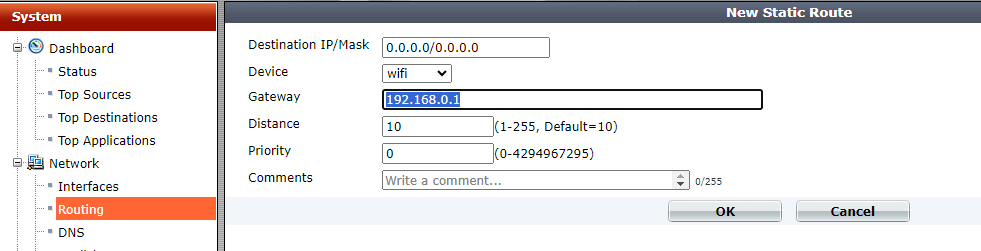
There is no connectivity
to the Internet
beyond the uplink access point.
Therefore,
we manually configure
the default gateway.
We were able to successfully ping
the Internet.
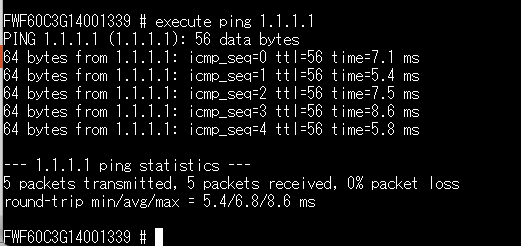
In the pane shown below,
if you enable “Retrieve default gateway from server,”
the Wi-Fi interface loses its IP address.
Therefore, this method is not recommended.
■QoS
We will also verify
that the device functions properly
as a network appliance,
ensuring that traffic for specified classes
does not exceed
the configured bandwidth limits.
Performance evaluation of QoS
is one of our core strengths.
In addition,
we will demonstrate through testing
how the legacy priority control method
known as PQ
can indefinitely delay
the transmission of long packets.
Lack of awareness
of this anti-pattern
often leads to configurations
where everything is placed into PQ.
This reflects a broader issue:
many network engineers
are not sufficiently familiar
with the underlying principles
of CPU scheduling behavior.
■VoIP
In the era of Web-RTP,
there is little reason
to rely on the legacy
“SIP-specific NAT handling” anymore.
Regarding VoIP,
we have repeatedly challenged
questionable claims
made by so-called
“Web-RTP providers.”
Key findings are listed below.
“The cause is electromagnetic interference.”
→ We monitored
with a spectrum analyzer
for several days
across the 40 MHz–6 GHz range.
No transient emissions
capable of explaining the issue
were detected.
“The packet payload is not RTP.”
→ When decoded in Wireshark
as RTP, the payload
was confirmed to be RTP.
It was possible
to reconstruct audio files
from the packets.
However, spectrum analysis
showed full-band dispersion,
indicating encryption.
Therefore, in that case,
we were unable to identify
the root cause
of the reported noise.
This should perhaps belong
in the QoS section,
but many Web-RTP providers
do not understand
excess burst
or committed burst parameters.
Some even claim
that “the peer router is Cisco,
so it will handle it properly.”
In practice,
they often do not understand
RSVP at all.
A short two-way discussion
usually reveals
the technical gaps immediately.
Noise in VoIP audio
may be caused by
AI-based noise cancellation.
Voices from other operators
in the background
are not always removed effectively.
In some cases,
traditional phase-inversion
techniques
(overlaying an inverted signal
from the rear direction)
can be more effective.
■Web filtering
on a cloud service platform
Cloud services may “move” servers geographically
during an active session.
As a result,
the destination IP address
can change while communication is in progress.
Because of this behavior,
there are cases
where Web filtering
cannot be enabled.
The cause is outlined below.
When packet fragmentation occurs
during communication,
two well-known domestic UTM vendors
(both Y and N)
lose connectivity.
FortiGate, however,
continues communication
without issue.
Both vendors confirmed
that the root cause
is the same.
(We verified this directly
with the manufacturers.
The fact that they were not fully aware
of the issue in real operations
was somewhat concerning.)
- They perform Web filtering
by inspecting strings
inside packet payloads
rather than using DNS.
When packets are fragmented,
the payload cannot be read. - Allowed IP addresses
are internally cached.
FortiGate performs Web filtering
based on FQDN,
so this interruption
does not occur.
For vendor Y,
we confirmed the algorithm
through the reseller.
For vendor N,
we reproduced the issue ourselves
and escalated it
to the manufacturer.
In the case of vendor N,
out of roughly 50 tests,
the issue occurred
in more than 5 out of 6 attempts.
For FortiGate,
after 6 consecutive successful runs,
we concluded the test.
We will reproduce this behavior
in our own environment
and publish the results.
For reference,
we list the tools
to be used.
Tools used
Httping
Cisco 800
(used as a Web server,
with multiple IP addresses
assigned via secondary IP)
FakeDNS
■Twice NAT
(A workaround used when a cloud environment
and an on-premises network
share the same IP address range)
This is not a particularly advanced technique,
but there are still cases
where deployments are abandoned
simply because
the cloud environment
and the on-premises LAN
use the same IP subnet.
The original designer
is the same as that of the SSG line,
although it is not widely known
that Juniper merely acquired
the NetScreen company.
Since implementation
is not guaranteed
in every environment,
we will actually deploy it
and verify through testing.
■FQDN routing
(DNS-based routing)
For high-volume traffic
such as Office 365 updates,
it is generally preferable
to use a dedicated circuit
or an internal WSUS server
(although WSUS itself
may now be considered legacy).
However,
when the IP addresses
returned by DNS change,
routing cannot be controlled
reliably using conventional methods.
For this reason,
routing is performed
based on DNS information
(FQDN routing).
We will verify this behavior
in practice
and publish the results.
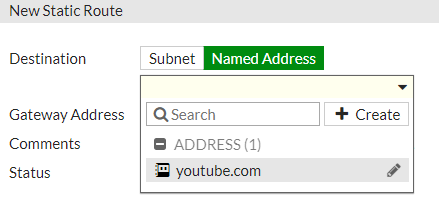
The configuration
looks like this:
when creating an address policy,
there is a checkbox labeled
“Use in static route.”
Once enabled,
the static-route creation pane
appears as shown below.
■Outbound load balancing
When multiple circuits are available,
this enables high cost-performance
Active/Active operation.
We will build an intentionally unbalanced setup
in which one circuit
is consistently lower in quality,
and verify the behavior in practice.
Inbound load balancing
is also possible,
but only with basic health checks.
Therefore, it is not suitable
for full Web server load balancing.
It is worth noting
that by combining multiple DNS servers,
a form of wide-area load balancing
can be achieved.
Since FortiGate itself
can operate as a DNS content server,
we will also test
whether wide-area load balancing
can be implemented
using FortiGate alone.
Using another network device
to perform Twice NAT
—so that the load-balanced destination
and source are translated simultaneously
before querying FortiGate for DNS—
would technically work,
but that approach
does not feel aligned
with the design intent.
■Split VPN
We often see organizations
applying IPsec
on top of already encrypted traffic
such as Office 365,
SNMP over TLS,
and DNS over TLS,
resulting in unnecessary
performance overhead.
We will verify in practice
how encryption can be applied
only to selected traffic
—for example SMB
used by NAS systems—
and publish the results.
Organizations with ample budgets
often resolve such issues
by replacing equipment
with larger, more expensive models.
However, since our service
does not rely on SI-style resale
or pushing high-cost hardware,
we believe this is a strong case
demonstrating the value
of an optimization-focused approach.
■SSH inspection
This idea came from a separate discussion
about “dumping server memory via Telnet
for quarantine and inspection.”
Since SSH is encrypted,
it would normally be difficult
to detect malware
contained in server memory.
However, by combining it
with inspection features,
it may become possible,
so we will verify this behavior.
We will also test
whether it is possible
to block SCP/FTPS/SFTP
while allowing SSH itself
by using inspection features
on the network device side,
rather than disabling
file transfer functions
on the SSH server.
The results of these tests
will be published here.
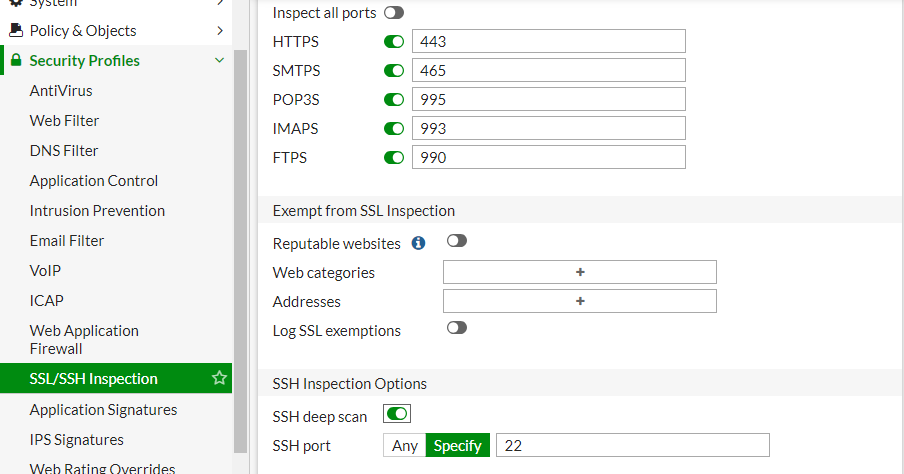
While it is obvious
that the device does not have
sufficient power
to accelerate Web servers,
we would still like to attempt
SSH certificate interception.
From the image below,
it is not yet clear
how the SSH private key
would be installed.
■Filtering of mirrored packets
There should be a function
to prevent the device
from behaving statefully.
We will verify
whether this can be achieved
by combining it
with transparent mode.
However,
since FortiGate alone
is capable of capturing packets
while applying filters,
it may be sufficient
to perform filtering
directly in transparent mode.
■Time-based application control
(Parental control)
Only during specified time periods
are selected applications
(or their traffic) permitted.
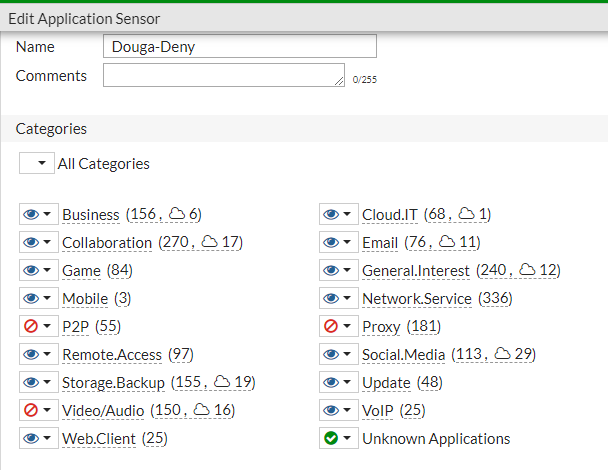
In the example below:
- From 06:00 to 10:00, all traffic is allowed.
- During all other hours, video (YouTube) is blocked.
The parent IPv4 policy
is set to allow,
and a child application-control policy
is applied
to block Video/Audio.
In this configuration,
only video traffic is blocked,
while other communications remain permitted.
YouTube is blocked,
but video content
embedded in news sites
is not blocked.

■Multicast
When used in combination with Wi-Fi,
it is unclear whether there is a function
that converts destination MAC addresses
from multicast to unicast
or performs load balancing.
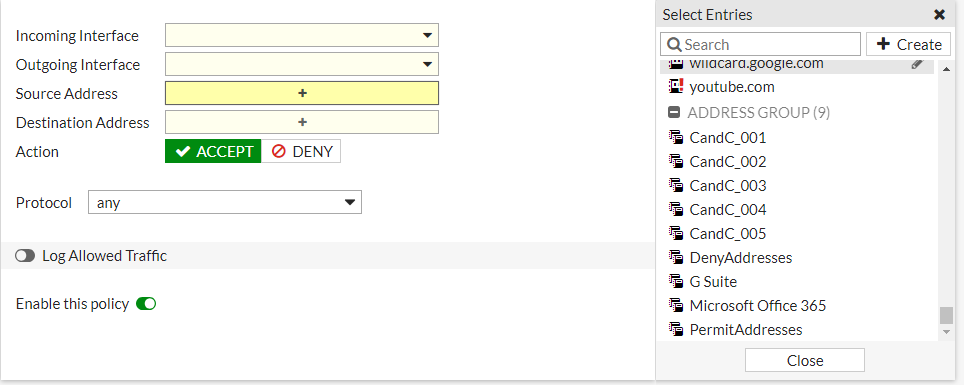
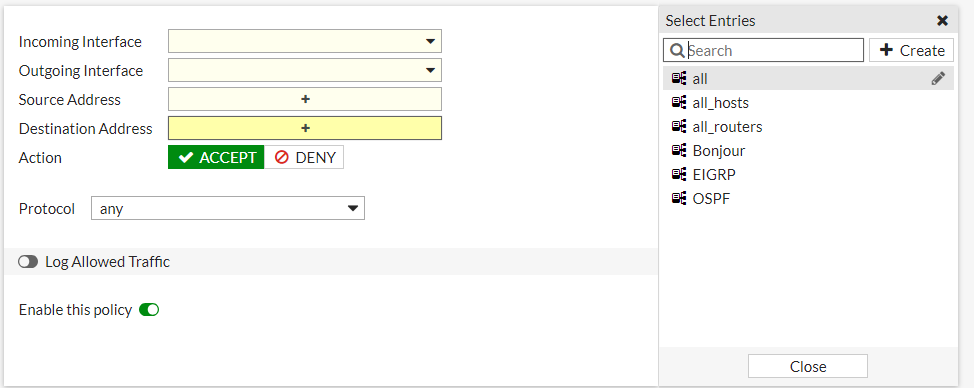
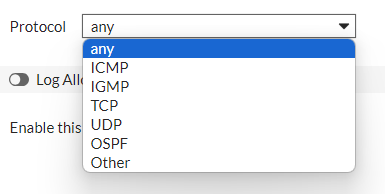
However, the following type of control
appears to be possible.
Rather than conducting exhaustive tests
using tools such as VNC,
we plan to perform validation
after Hikari TV is installed in our home.
Testing with real multicast traffic
is more meaningful
than relying solely on synthetic simulations.
■Countermeasures against residential IP–based attacks
Deploy one unit
in transparent mode
at each teleworker’s home,
and have IPS/WAF
inspect traffic
in the WAN-to-LAN reverse direction.
Validation is likely unnecessary.
■Quarantine traffic
between Docker containers
This may be achievable
in transparent mode.
We will verify this
on actual hardware later.
It is unclear
how meaningful the results will be,
but we may also test
using a VM-based virtual appliance.
コメントを残す